What is schema.org and why use it
Schema.org is a standardized vocabulary of types and properties (for example Product, Recipe, Event, FAQ) maintained by search engines and the community to describe page content. When you mark up your content with schema.org, you make it much easier for machines to process and understand it.
JSON-LD vs. Microdata vs. RDFa - which to choose
Google and many other sources recommend JSON-LD whenever possible - it’s the simplest, less error-prone, and easier to maintain. Microdata and RDFa insert markup directly into HTML and can be useful in some situations, but are usually harder to manage.
Main benefits of using structured data
- Better chance of appearing as rich results (i.e., more prominent search listings).
- Higher CTR - users click results more often when they include ratings, images, or extra info.
- Faster indexing and improved understanding of your content by search engines.
- Control over how your brand appears - highlight FAQs, reviews, opening hours and other helpful content.
- Combine multiple schema types on a single page (e.g., Product + Review + BreadcrumbList).
Key schema types (quick overview)
- Article / NewsArticle – for blogs and news.
- Product + Offer – e-commerce (price, availability, rating).
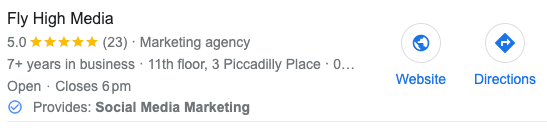
- LocalBusiness / Organization – local companies (opening hours, address).
- Recipe, HowTo – recipes and step-by-step guides (time, ingredients, steps).
- Event – date, venue, tickets.
- FAQPage / QAPage – frequently asked questions and Q&A pages.
- BreadcrumbList – navigational breadcrumbs.
- JobPosting – job offers.
You can find more types in the schema.org documentation.
Practical examples - JSON-LD snippets
Below are short examples you can place in the <head> (or just before </body>)
Product (Product + Offer)
<script type="application/ld+json">
{
  "@context": "https://schema.org/",
  "@type": "Product",
  "name": "Massage Gun X",
  "image": "https://example.com/images/gun.jpg",
  "description": "A powerful massage gun for muscle recovery.",
  "sku": "MG-X-001",
  "offers": {
    "@type": "Offer",
    "url": "https://example.com/product/massage-gun-x",
    "priceCurrency": "EUR",
    "price": "129.00",
    "availability": "https://schema.org/InStock"
  },
  "aggregateRating": {
    "@type": "AggregateRating",
    "ratingValue": "4.7",
    "reviewCount": "214"
  }
}
</script>
FAQ (FAQPage)
<script type="application/ld+json">
{
  "@context": "https://schema.org",
  "@type": "FAQPage",
  "mainEntity": [{
    "@type": "Question",
    "name": "How long does delivery take?",
    "acceptedAnswer": {
      "@type": "Answer",
      "text": "Delivery usually takes 2–4 business days."
    }
  },{
    "@type": "Question",
    "name": "What is the warranty period?",
    "acceptedAnswer": {
      "@type": "Answer",
      "text": "The warranty period is 24 months."
    }
  }]
}
</script>
Step-by-step implementation (WordPress and manual)
- 1Choose the right schema type for your content (product, article, event, etc.).
- 2Create the JSON-LD – manually if you can, or generate it with a tool.
- 3WordPress recommendation: use plugins like Rank Math or another SEO plugin that adds schema automatically and allows easy configuration.
- 4Insert the code into the <head> or let your plugin handle it.
- 5Test your pages with Google’s Rich Results Test and/or the Schema Markup Validator. If the content type is eligible for Google rich results (e.g., recipe, product), Rich Results Test will show which enhanced results your page may be eligible for. For general schema validation, use the Schema Markup Validator.
- 6Monitor results (Search Console, organic traffic, CTR).
Testing & tools
- Google Rich Results Test – checks which rich results a page can generate.
- Schema Markup Validator (validator.schema.org) – general schema.org validation.
- Google Search Console (Performance / Enhancements) – monitor errors and trends.
- Rank Math / Yoast – WordPress plugins that simplify adding schema.
Common mistakes to avoid
- Inconsistent data (e.g., price in JSON-LD differs from the page).
- Missing required properties for the schema type – the validator will flag these.
- Duplicate or conflicting schema blocks – multiple blocks that contradict each other.
- Placing schema in areas not publicly accessible (e.g., behind login) – always test public URLs.
- Overusing schema without user value – Google may ignore or devalue markup that doesn’t genuinely improve user experience.
Measuring impact
Track impressions, CTR, and position in Google Search Console. Pages that gain rich snippets often see higher CTR; over time, improved user signals (more clicks, longer dwell time) can also help rankings.
Final recommendations
- Start with a few key schema types (Product, FAQ, Breadcrumb, Article) and expand gradually.
- Use JSON-LD for simplicity and maintainability.
- Test and monitor regularly (Rich Results Test + Schema Markup Validator + Search Console).
Written by
Peter Gáborík
Founder of WebOptim and digital marketing specialist with a focus on web trends and SEO strategies.
Related service